
Ausgangslage#
Zwei Proxmox-Nodes, eine Firewall-VM, kein Shared Storage. Die Anforderung: bei Ausfall eines Nodes soll die Firewall-VM automatisch auf dem anderen Node starten. Sekunden-genaue Synchronisation ist nicht nötig – der Datenzustand darf etwas älter sein.
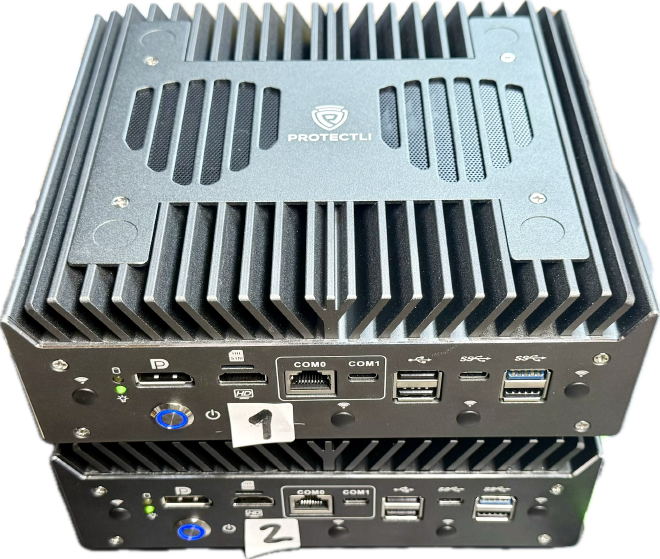
Dafür wurde ein Proxmox-Cluster mit QDevice als drittem Quorum-Vote und ZFS-Replikation im 5-Minuten-Takt aufgebaut.
Architektur#
- Node 1 + Node 2: identisch konfiguriert, jeweils lokales ZFS (Mirror)
- QDevice: läuft z.B. auf einem Raspberry Pi (nur Quorum, keine VM-Daten)
- VM-Replikation: per Proxmox intern (
pvesr) alle 5 Minuten
Das ist kein synchrones Storage-Cluster. Im Worst Case gehen bis zu 5 Minuten an Änderungen verloren (Recovery Point Objective, kurz RPO). Für eine Firewall, deren Regelwerk sich nicht minütlich ändert, reicht das.
Voraussetzungen#
- Beide Proxmox-Nodes erreichbar, Uhrzeit/NTP synchron
- Gleiche Netzsegmente für Cluster/Management/Replication (produktiv: Corosync und Replikation auf getrennten NICs – Corosync ist latenz-empfindlich, Replikation frisst Bandbreite)
- ZFS auf beiden Nodes eingerichtet (genug Platz für replizierte VM-Disks)
- QDevice-Host stabil erreichbar (z.B. Raspberry Pi an drittem Standort)
- Firewall-VM läuft zunächst primär auf Node 1 (Node 2 ist Replikationsziel)
- E-Mail-Alerts auf den Nodes konfiguriert – sonst bleiben Replikations- und HA-Fehler unbemerkt (alternativ externes Monitoring auf
pvecm status,pvesr status,zpool status)
Proxmox-Cluster bilden#
Auf Node 1 den Cluster erstellen, Node 2 tritt bei:
# Node 1: Cluster erstellen
pvecm create mein-cluster

# Node 2: Cluster beitreten
pvecm add 10.0.0.11

# Quorum prüfen
pvecm status
QDevice anbinden#
Ein klassisches 2-Node-Cluster hat ein Quorum-Problem: fällt ein Node aus, fehlt die Mehrheit. Das QDevice löst das als dritter Vote.
Die Einrichtung des QNetd-Dienstes auf dem externen Host (z.B. einem Raspberry Pi) ist gut dokumentiert – eine kompakte Anleitung findet sich etwa im Proxmox-Wiki unter QDevice .
Auf den Proxmox-Nodes:
# Auf beiden Proxmox-Nodes
apt install corosync-qdevice

# QDevice vom Cluster aus einrichten (einmalig, z.B. von Node 1)
pvecm qdevice setup 10.0.0.120
Quorum prüfen#
pvecm status
Erwartete Ausgabe im Normalbetrieb:
Cluster information
-------------------
Name:             prox
Config Version:   5
Transport:        knet
Secure auth:      on

Quorum information
------------------
Date:             Tue Apr 14 13:11:42 2026
Quorum provider:  corosync_votequorum
Nodes:            2
Node ID:          0x00000002
Ring ID:          1.123
Quorate:          Yes

Votequorum information
----------------------
Expected votes:   3
Highest expected: 3
Total votes:      3
Quorum:           2
Flags:            Quorate Qdevice

Membership information
----------------------
    Nodeid      Votes    Qdevice Name
0x00000001          1    A,V,NMW 10.0.0.11
0x00000002          1    A,V,NMW 10.0.0.12 (local)
0x00000000          1            Qdevice
So liest man die wichtigsten Zeilen#
- Nodes: 2 – zwei echte Proxmox-Knoten im Cluster
- Quorate: Yes – der Cluster hat aktuell Quorum und darf normal arbeiten
- Expected votes: 3 – drei Votes eingeplant (Node 1, Node 2, QDevice)
- Total votes: 3 – alle drei Votes sind aktuell verfügbar
- Quorum: 2 – mindestens zwei Votes nötig, damit der Cluster aktiv bleibt
- Flags: Quorate Qdevice – Quorum ist aktiv, QDevice korrekt eingebunden
ZFS-Storage auf beiden Nodes#
Lokalen ZFS-Pool auf beiden Nodes anlegen – identischer Aufbau. Wichtig: Pool-Name und Dataset-Struktur müssen auf beiden Nodes exakt gleich sein. Heißt der Pool auf Node 1 pool1, muss er auch auf Node 2 pool1 heißen – sonst findet pvesr das Replikationsziel nicht und bricht mit “storage not available on target node” ab.
Optional pro Node als Mirror spiegeln, damit ein einzelner Datenträger-Ausfall den Node nicht direkt stoppt:
# Lokalen Mirror-Pool anlegen
zpool create pool1 mirror /dev/sda1 /dev/sdb1

# Status prüfen
zpool status
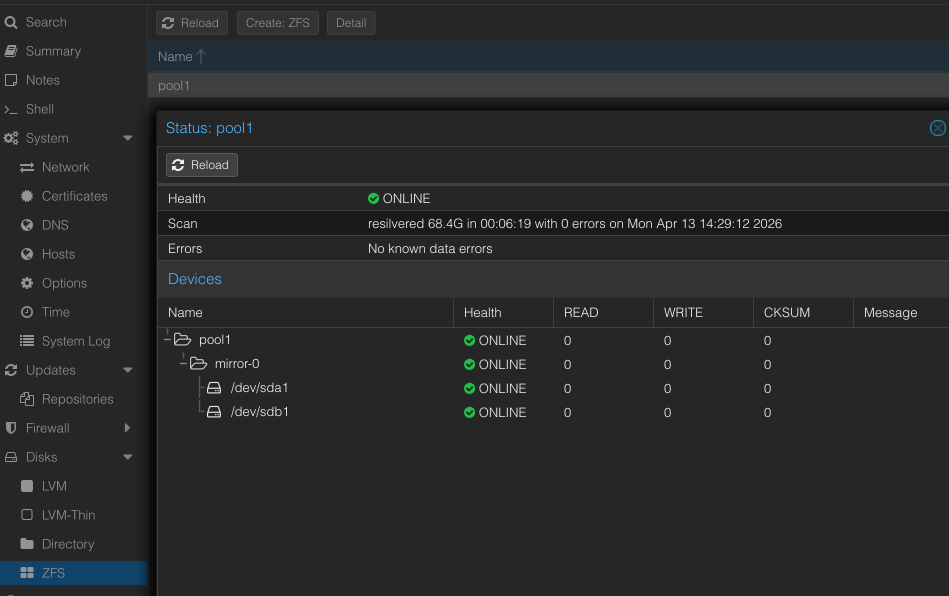
Der Pool zeigt Health ONLINE mit 0 Errors auf beiden Mirror-Disks.
In Proxmox den Pool als Storage registrieren:
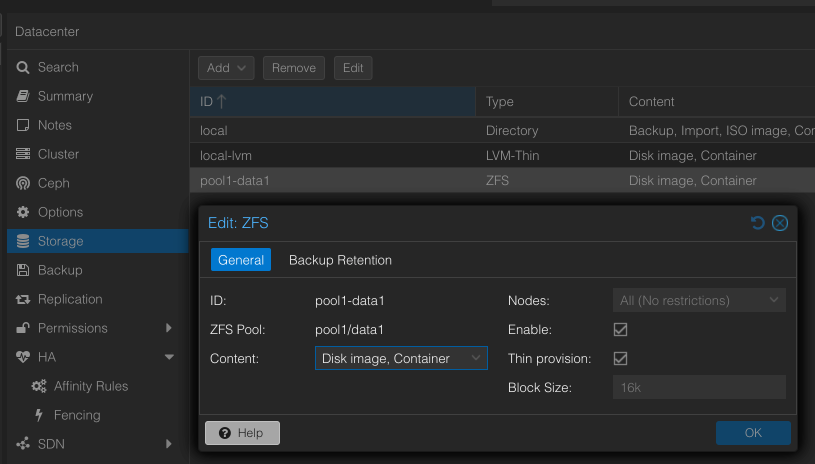
Das ist ein lokaler Schutz pro Node (Disk-Redundanz) und ersetzt nicht die Replikation zwischen Node 1 und Node 2.
Replikationsjob anlegen#
In Proxmox für die Firewall-VM Replikation von Node 1 → Node 2 aktivieren. Intervall: alle 5 Minuten.
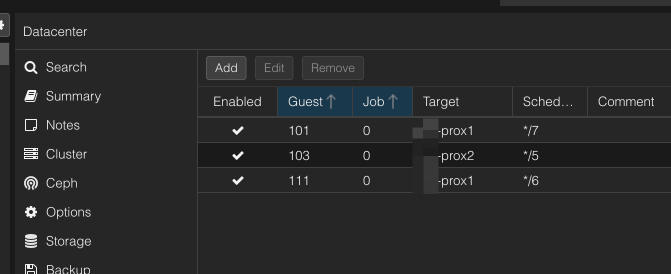
Status der Replikation prüfen:
pvesr list
pvesr status
Gesunde Ausgabe:
JobID      Enabled    Target              LastSync             NextSync   Duration  FailCount State
101-0      Yes        local/prox2      2026-04-14_13:50:03  2026-04-14_13:56:00   5.383416          0 OK
103-0      Yes        local/prox2      2026-04-14_13:50:08  2026-04-14_13:55:00   1.910102          0 OK
111-0      Yes        local/prox2      2026-04-14_13:50:01  2026-04-14_13:54:00   2.099421          0 OK
Alle Jobs OK, FailCount 0, letzte Sync wenige Minuten her.
Wichtig zum Verständnis: Die VM-Konfiguration (/etc/pve/qemu-server/101.conf) liegt auf dem Proxmox-Cluster-FS und ist ohnehin auf allen Nodes identisch vorhanden. Repliziert werden nur die VM-Disks. Nach einem Failover startet Node 1 die VM mit aktueller Config, aber Disk-Stand der letzten Replikation.
HA-Verhalten definieren#
Watchdog / Self-Fencing#
Proxmox HA braucht einen Watchdog. Verliert ein Node das Quorum, rebootet er sich nach etwa 60 Sekunden über den Watchdog selbst – so kann die VM sicher auf dem anderen Node starten, ohne dass sie doppelt läuft (Split-Brain).
Default ist softdog (Kernel-Software-Watchdog). Ein Hardware-Watchdog (iTCO, IPMI, iLO) ist zuverlässiger, weil er unabhängig vom Kernel auslöst – wer kann, sollte den aktivieren.
VM als HA-Ressource#
Die VM wird als HA-Ressource definiert. Bei Node-Ausfall startet Proxmox sie auf dem verbleibenden Node:
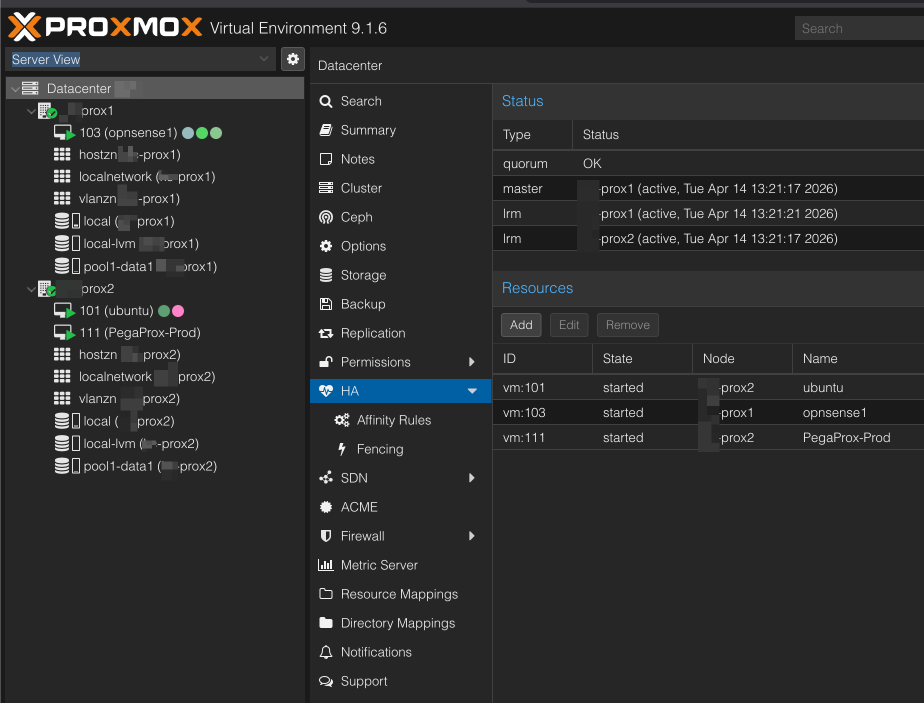
Im Edit-Dialog werden die wichtigsten Parameter gesetzt – Request State started, Max. Restart und Max. Relocate, sowie Failback:
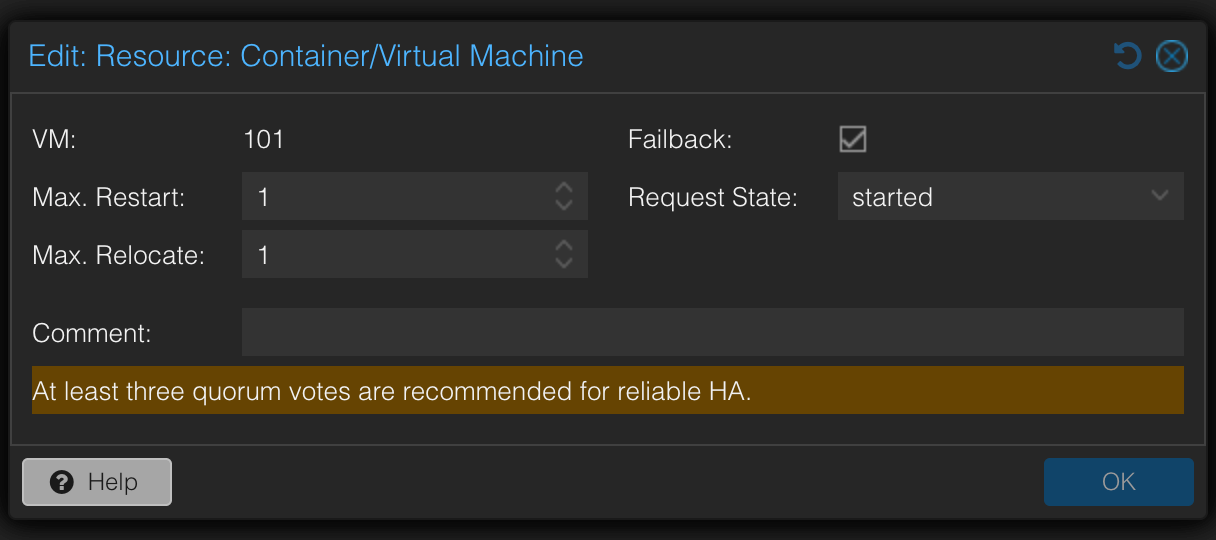
Der Datenstand entspricht der letzten erfolgreichen Replikation. Der Hinweis “At least three quorum votes are recommended for reliable HA” bestätigt noch einmal, warum das QDevice im 2-Node-Setup Pflicht ist.
Failover in der Praxis#
Node-Ausfall simulieren#
Nach dem Ausfall von Node 2 zeigt pvecm status:
Quorum information
------------------
Date:             Tue Apr 14 13:37:04 2026
Quorum provider:  corosync_votequorum
Nodes:            1
Node ID:          0x00000001
Ring ID:          1.127
Quorate:          Yes

Votequorum information
----------------------
Expected votes:   3
Highest expected: 3
Total votes:      2
Quorum:           2
Flags:            Quorate Qdevice

Membership information
----------------------
    Nodeid      Votes    Qdevice Name
0x00000001          1    A,V,NMW 10.21.7.11 (local)
0x00000000          1            Qdevice
Quorate: Yes – obwohl nur noch 1 Node da ist. Node 1 + QDevice ergeben 2 von 3 Votes, das reicht. Ohne QDevice wäre der Cluster blockiert.
Die Replikation schlägt fehl – logisch, Node 2 ist ja weg:
JobID      Enabled    Target              LastSync             NextSync   Duration  FailCount State
101-0      Yes        local/prox2             -                    -    4.48416          1 ...exit code 255
103-0      Yes        local/prox2      2026-04-14_13:35:01         -   1.308893          1 ...exit code 255
111-0      Yes        local/prox2             -                    -   3.039043          1 ...exit code 255
Sobald der Zielnode wieder da ist, laufen die Jobs von allein an.
Recovery#
Node 2 ist wieder online. Der Cluster zeigt sofort alle 3 Votes:
Votequorum information
----------------------
Expected votes:   3
Highest expected: 3
Total votes:      3
Quorum:           2
Flags:            Quorate Qdevice

Membership information
----------------------
    Nodeid      Votes    Qdevice Name
0x00000001          1    A,V,NMW 10.21.7.11 (local)
0x00000002          1    A,V,NMW 10.21.7.12
0x00000000          1            Qdevice
Alle 3 Votes zurück, Replikation wieder OK, FailCount 0. Kein manueller Eingriff nötig.
Grenzen und Erwartungen#
✅ Was diese Lösung kann#
- Node-Ausfall überstehen: VM startet automatisch auf dem anderen Node
- Quorum ohne dritten Server: QDevice reicht als dritter Vote
- Einfacher Betrieb: kein SAN, kein Shared Storage
- Automatische Recovery: nach Node-Rückkehr läuft die Replikation von allein wieder an
⚠️ Was diese Lösung nicht kann#
- Synchrone Zustandsübernahme: Datenverlust bis zum letzten Replikationslauf möglich (RPO)
- Sofortiger Failover: vom Node-Ausfall bis die VM auf dem anderen Node wieder erreichbar ist vergehen in der Praxis ca. 3 Minuten (Watchdog-Reboot + HA-Übernahme + VM-Boot)
- Split-Brain-Schutz ohne QDevice: ohne den dritten Vote blockiert das Quorum
- Kein Backup-Ersatz: HA schützt gegen Hardware-Ausfall, nicht gegen gelöschte VMs, Ransomware oder Fehlkonfiguration – die repliziert sich nämlich auch sauber auf den zweiten Node
Für eine Firewall, deren Regelwerk nicht ständig mutiert, passt das. Als Backup-Lösung läuft bei uns zusätzlich Proxmox Backup Server – er hält inkrementelle, deduplizierte Snapshots der VMs unabhängig vom Cluster vor.
Alternativen: PegaProx#
Wer mehrere Proxmox-Cluster zentral verwalten will, sollte sich PegaProx anschauen. PegaProx bietet unter anderem ein eigenes 2-Node-HA-Feature, das über die native Proxmox-HA hinausgeht. Im Lab-Test hat das bei uns allerdings nur mit Einschränkungen funktioniert – vermutlich, weil PegaProx für das 2-Node-HA Shared Storage erwartet und lokales ZFS mit Replikation nicht vollständig unterstützt wird. Für den hier beschriebenen Ansatz (lokales ZFS + pvesr) bleiben die Proxmox-Bordmittel die bessere Wahl.
Weiterführende Links#
- Proxmox Cluster Manager & QDevice – Corosync External Vote Support, QDevice-Setup
- Proxmox Storage Replication (pvesr) – ZFS-Replikation zwischen Nodes
- Proxmox High Availability – HA-Manager, Ressourcen, Failover
- Proxmox HA-Manager Referenz – Detaillierte Dokumentation
- pvesr Manpage – CLI-Referenz für Replikationsjobs
- PegaProx Dokumentation – Multi-Cluster-Management für Proxmox VE
Fazit#
Zwei Nodes, ein QDevice, ZFS-Replikation. Kein Shared Storage, kein SAN, trotzdem Failover. Die Proxmox-Bordmittel (pvesr, HA-Manager) reichen dafür aus.
Wim Bonis ist CTO bei Stylite AG und beschäftigt sich schwerpunktmäßig mit Storage, Virtualisierung und Open-Source-Infrastruktur.